What is a shipping order? Definition, role, and best practices
June 19, 2026

June 19, 2026

When an order leaves the warehouse, several things need to stay in sync: what was shipped, how many units went out, what inventory remains available, and what information is shared with the customer. As order volumes grow, this tracking can quickly become difficult if documents and data are not properly organized.
For both B2B and B2C companies, the shipping order plays a central role. It accompanies the goods, confirms what leaves the business, and provides a reliable record of each shipment. When used properly, it makes the work of sales, logistics, and administrative teams much easier.
This document also helps secure the customer relationship. If there is any doubt about a delivered quantity, a missing product, or a damaged package, it becomes a reference point. It still needs to be clear, complete, and connected to the rest of your inventory management process.
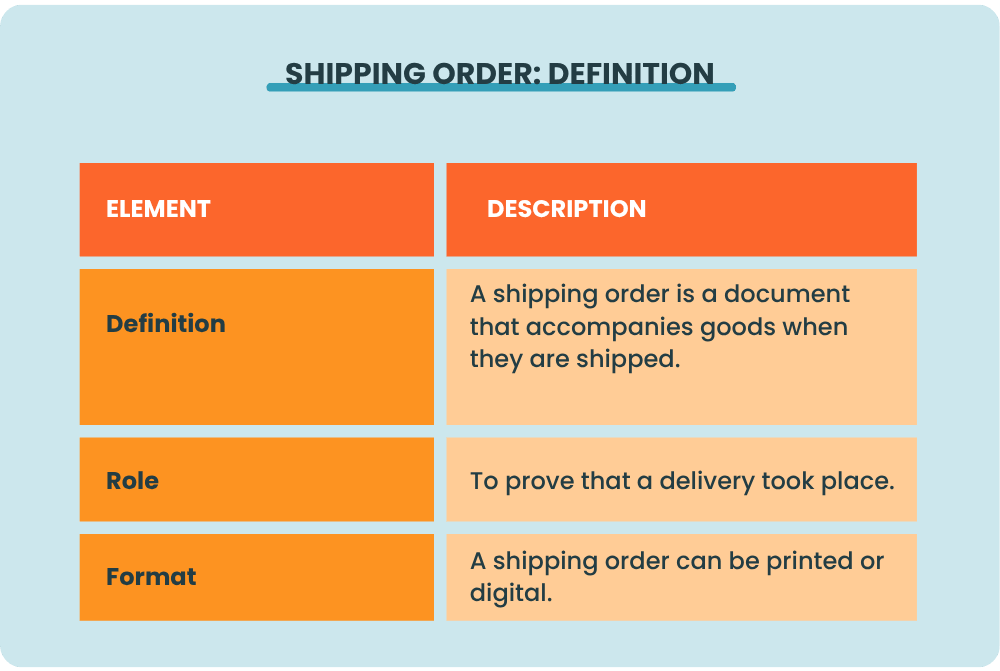
A shipping order is a document that accompanies goods when they are shipped. It details the products delivered, the quantities sent, the delivery date, and the information related to the customer and the supplier.
Its role is simple: to prove that a delivery took place. When it is signed by the customer or by the person receiving the goods, it becomes proof of delivery. It confirms that the products were received, either in full or with reservations if an issue is noted.
A shipping order can be printed and included with the packages. It can also be digital, sent by email, or generated from business management software.
It should not be confused with an invoice. The purchase order confirms the purchase, the shipping order follows the shipment, and the invoice formalizes the payment.
A shipping order is used first and foremost to keep a reliable record of every item shipped.
In a B2B business, this document plays an important role in operational tracking. Orders can be large, delivered in multiple shipments, include similar SKUs, or be sent to different addresses depending on the customer’s locations. Without a clear shipping order, a quantity error can delay invoicing, slow down the sales team, or create a claim that is difficult to resolve.
In a B2C business, the shipping order mainly helps companies handle higher volumes without losing track. It makes it possible to check what was prepared, include a clear document with the package, and quickly retrieve information if a question comes up after delivery. For a company that ships every day, this record avoids having to search through several tools or files when an issue is reported.
The shipping order also improves internal coordination. Logistics teams can track outgoing goods. Sales teams can answer more quickly when asked about an order status. The administrative team can match the delivery to the order before invoicing. When everyone works from the same document, communication is smoother and errors are easier to identify.
Finally, it serves as proof in the event of a dispute, return, or credit note. A disputed quantity, a missing product, a damaged package, or a misunderstood partial shipment. It is a document that helps the business stay in control of its flows, from the moment goods leave the warehouse until the order is closed.
A shipping order should provide a clear overview and generally includes:
This list may vary depending on the business. A company selling food products, industrial components, or perishable goods may need more detailed information or additional fields, such as batch numbers, expiration dates, serial numbers, or specific transportation conditions.
The shipping order should clearly identify both parties. On the supplier or seller side, it usually includes the company name, contact details, and sometimes an identification number. On the recipient side, the document shows the name of the company or individual receiving the goods, their address, and any useful information needed to organize the handoff.
When filling out a shipping order, make sure you do not copy an address from an old file, use an outdated contact name, or enter the wrong delivery location.
The core of the shipping order is the product list. Each line should clearly identify the item shipped and the quantities sent. Being precise in your shipping orders is especially useful when you sell products with variants or when you handle partial deliveries.
Let’s take a simple example. An order includes 40 cartons of a product, but only 30 are available at the time of preparation. The remaining 10 will be delivered later. The shipping order should reflect the reality of this first shipment, not the initial order as a whole.
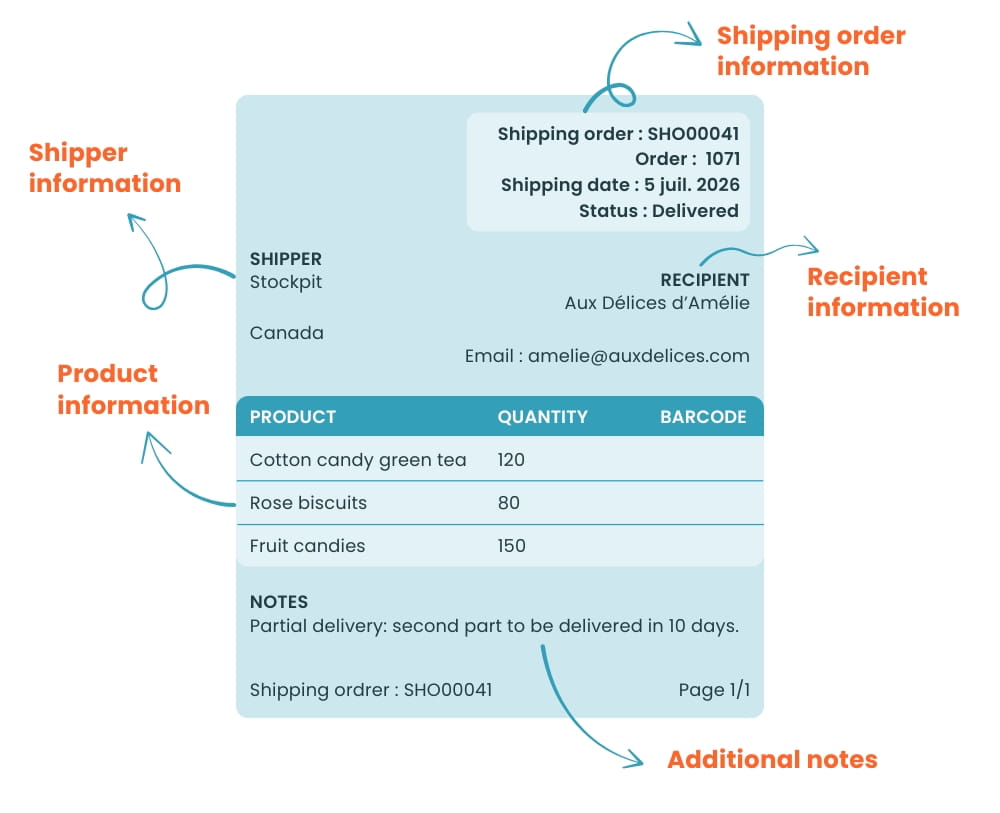
To avoid errors, the best approach is to define a shared template for the entire company. Teams save time, and every document stays consistent from one order to the next. It should also remain easy to read for everyone involved in the chain: preparation, transportation, administration, and customer service.
The second tip is to connect the shipping order to your other commercial documents. The order number, accepted estimate, or related invoice should be easy to find. This link prevents teams from starting from scratch when a customer asks a question, when an invoice needs to be checked, or when a return has to be processed.
Before validating the shipping order, keep a short control routine:
Another point that is often overlooked is archiving. A shipping order is not only useful on the day the goods are shipped. It may be needed several weeks later to answer a customer request, justify an invoice, process a return, or understand an inventory discrepancy. A clear filing system by order, customer, or date helps avoid wasting time when the information becomes urgent.
Finally, remember to update your template over time. If teams always add the same note manually, a field may be missing. If the same errors keep happening, the document probably needs to be adjusted. An effective shipping order should remain simple, but it should also reflect the reality of your business.
Creating a shipping order manually can work in the beginning. A document template, a few copy-pastes, a shared file. But this setup quickly reaches its limits as volumes increase or several people start working on orders.
Shipping order software, usually included in your inventory management software, allows you to generate the document faster, using information pulled directly from the customer order. This reduces data entry errors and prevents multiple versions of the same document from being created. The shipping order can be edited, shared, printed, or archived more easily.
The value becomes even greater when the shipping order is connected to inventory management. The document no longer stands alone. It becomes linked to the order, reserved quantities, shipment, and actual inventory.
For teams, the benefit is very practical. Sales can see the progress of the order. Logistics prepares the right products. Administration knows whether the delivery has taken place. Management gets better visibility into product flows. Fewer files are passed around, less information gets lost, and fewer decisions are made without reliable data.
Automation also helps optimize processes. Shipping orders can be created from orders, delivered quantities can be tracked, partial deliveries can be managed more easily, and inventory can be updated in real time. For an SMB managing several warehouses, multiple sales channels, or products tracked by batch, this information makes a real difference in day-to-day operations.
The shipping order is a document that may seem simple at first. When used well, it secures the delivery, protects the customer relationship, and improves operational tracking. It makes it possible to know what was shipped, what was received, and what still needs to be delivered.
Stockpit helps businesses optimize inventory, track available quantities, work with multiple storage locations, manage traceability, composite products, and purchasing, including shipping orders.
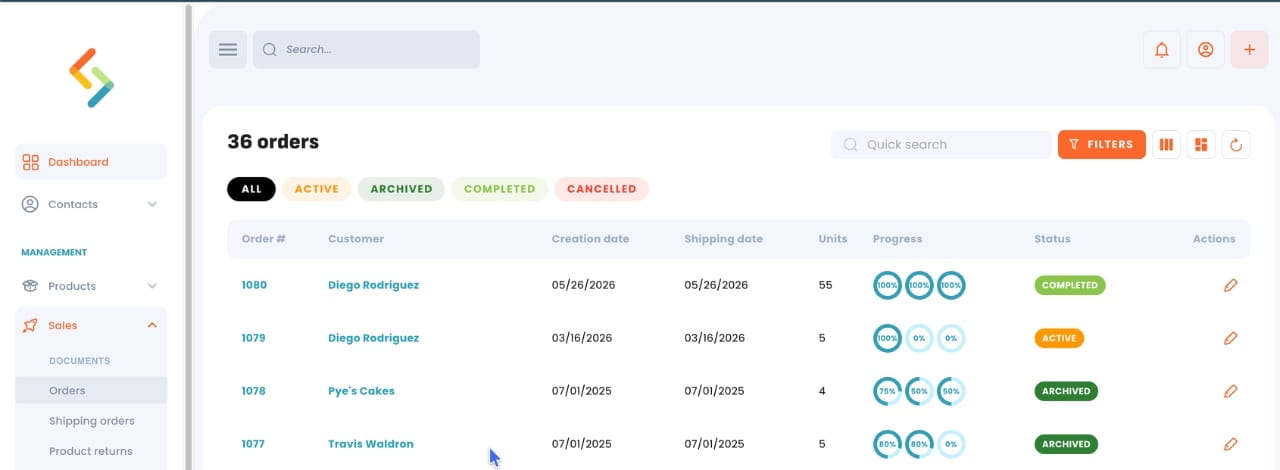
With Stockpit, shipping orders can be created from orders. This makes it possible to separate the sale from the delivery when both do not happen at the same time. A single order can generate one or several shipping orders, making it easier to track partial shipments. Reserved products, delivered quantities, and actual inventory are updated in real time.
For a business looking to optimize inventory management, this approach avoids working with isolated documents. Information flows more smoothly between sales, logistics, and administration. Teams save time, errors decrease, and customers receive more reliable information.
A shipping order is a document that accompanies goods when they are shipped. It indicates the products delivered, the quantities sent, customer information, and delivery details. Once signed upon receipt, it serves as proof that the goods were delivered.
A shipping order is not always mandatory, but it is strongly recommended. It helps keep proof of delivery and reduces disputes in case of a missing product, quantity error, or damaged goods.
The shipping order accompanies the goods and confirms what was delivered. The invoice is used to request payment. In practice, the shipping order helps verify that the products were delivered before the order is invoiced or closed.
Yes, a shipping order can be created, sent, and archived digitally. This saves time, reduces data entry errors, and makes it easier to find documents related to an order or shipment.
Software allows you to generate shipping orders from customer orders without entering the same information again. It also helps track shipped quantities, documents related to the sale, and inventory movements. This is especially useful when orders, products, or storage locations multiply.
Say goodbye to stockouts! Get your inventory valuation, monitor the inflow and outflow of products and keep track of your inventory.


